


Ever wondered if a single system could simplify every part of your workflow? Enterprise resource planning software brings together everyday functions like finance, supply chain, and human resources in one easy-to-navigate hub. Imagine sitting at your desk with all your live data and automated tasks right at hand, a bit like turning a complicated puzzle into a clear picture. In this article, we’ll explore how switching to a unified system can inspire smarter strategies, cut down on errors, and spark noticeable gains in efficiency and savings.
Enterprise Resource Planning Software: Boosting Growth
Imagine having one smart system that ties together everything from finance and supply chain to human resources, manufacturing, and procurement. ERP software does just that by centralizing your business operations. When everything’s in one place, you can watch real-time dashboards, run live analytics, and automate those repetitive, time-consuming tasks. It’s like having a control room where you can see production trends and handle payroll seamlessly from a single source.
Beyond just bringing parts together, ERP is your tool for smarter decision-making and cost savings. By automating daily chores, it cuts down on errors and boosts overall productivity. The user-friendly design helps teams react quickly to market shifts. And with built-in support for no-code automation connecting more than 8,000 apps, you can easily tailor the system to match your business needs without the technical headache.
- Savings through routine automation and fewer errors
- Higher productivity by combining scattered business tasks
- Better compliance with standardized, monitored processes
- Instant insights via centralized, up-to-date dashboards
- A unified pool of data that bridges the gap between different functions
Depending on your needs, ERP systems come in a few flavors. On-premise setups give you full control using your own hardware, ideal if you need strict data management. Cloud-based solutions, available via subscription, offer remote access with automatic updates and easier maintenance. And then there’s the hybrid approach, which combines the best of both worlds by mixing local control with the flexibility of cloud services.
Comparing Cloud-based and On-premise ERP Software Deployments
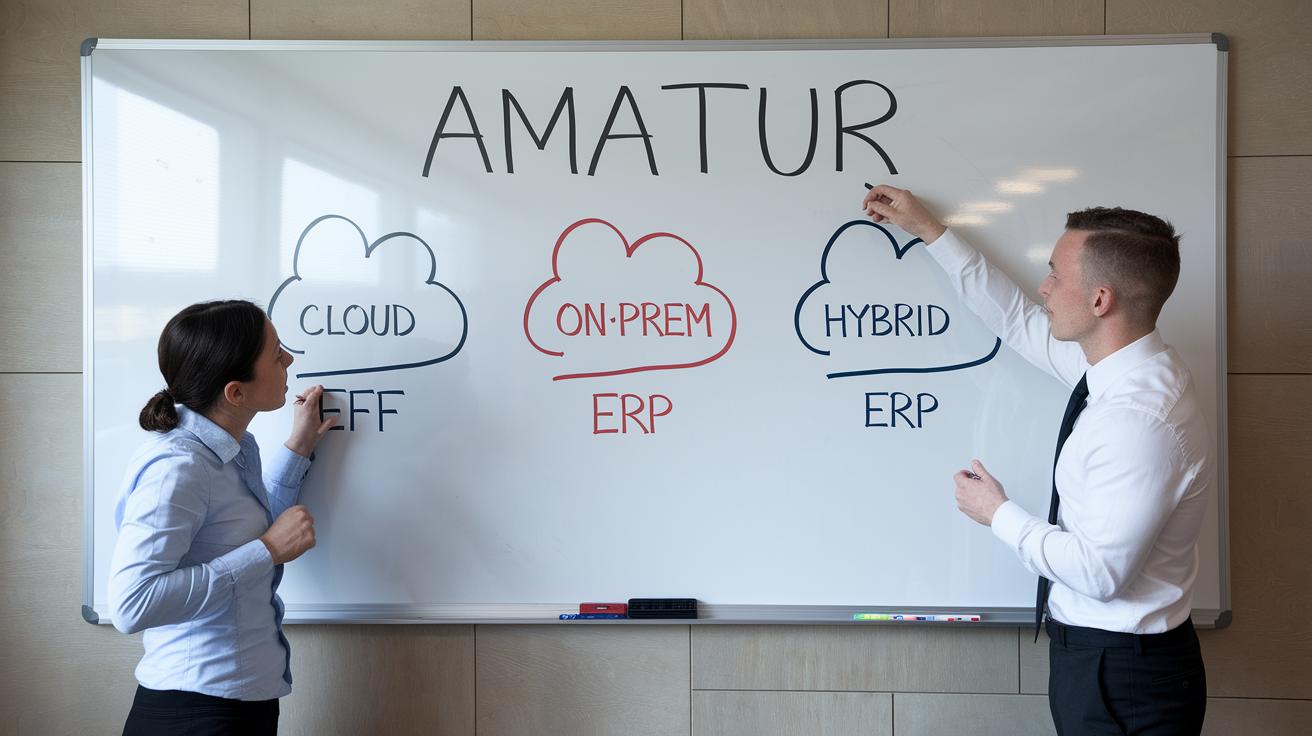
When picking an ERP model, it's all about finding the right fit for your organization's tech setup and needs. Cloud-based ERP uses a subscription model, auto-updates, and provides access from just about anywhere, which appeals to companies that want agility without heavy upfront costs. In contrast, on-premise ERP relies on dedicated hardware and in-house maintenance, giving you complete data control and precise compliance oversight. Some businesses even choose a hybrid model, blending cloud flexibility with the security of on-site systems.
| Deployment Type | Pros | Cons |
|---|---|---|
| Cloud ERP | Subscription pricing, automatic updates, remote access | Limited direct control, dependency on internet connectivity |
| On-premise ERP | Full control over data, established compliance | High initial costs, ongoing hardware maintenance |
| Hybrid ERP | Mix of remote flexibility and on-site control, scalability | Complex integration, managing dual environments |
For nimble businesses that need remote operations and seamless updates, cloud-based systems can be a perfect match. Meanwhile, if tight data oversight is a must, on-premise ERP might be the way to go. And for those with diverse departmental needs, a hybrid ERP often delivers the best balance of convenience and control.
Core Modules and Integration Strategies in ERP Software
A modular design in ERP systems is essential for any business that wants to streamline operations. By organizing functions into separate modules, companies can upgrade or add features without having to rework the entire system. Think of it like building with blocks, where each piece contributes to a robust, flexible structure.
| Module Name | Overview |
|---|---|
| Accounting Module | Automates transactions and delivers real-time financial insights to simplify monetary management. |
| Supply Chain Management | Optimizes resource flow from procurement to delivery, cutting delays and increasing transparency. |
| Human Capital Management | Handles employee data, recruitment processes, and performance tracking to boost workforce efficiency. |
| Manufacturing Process Automation | Monitors production lines, reduces downtime, and provides immediate feedback to refine processes. |
| Inventory Tracking and Control | Keeps stock levels up-to-date, automates reordering, and monitors product movement seamlessly. |
Modern ERP platforms tie these modules together using a variety of techniques. Real-time APIs allow different parts of the system to communicate instantly, while middleware acts as a helpful bridge between unsynchronized interfaces. Plus, no-code connectors simplify integration even further by linking thousands of apps without needing deep technical skills. This means data flows quickly, manual tasks are reduced, and operations are more efficient.
Smooth information exchange is at the heart of operational synergy. When every module talks to the others without hiccups, businesses can monitor performance in real time and make adjustments on the fly. Regular check-ups and updates keep the system connected, prevent data silos, and ensure the organization stays agile.
By aligning technology with clear business goals, companies can create an integrated ERP environment that not only manages day-to-day tasks but also drives strategic growth and continuous improvement.
Industry-specific Adaptations and ERP Case Studies

Companies in various sectors need ERP systems that are as unique as they are. Think of it like having a suit custom-tailored just for your industry, where every stitch is meant to solve a specific challenge or grab a new opportunity. Real-world cases show us that when you tweak an ERP to fit like a glove, operations get smoother and processes just click together.
- Manufacturing: Infor CloudSuite Industrial is a game changer for aerospace and heavy manufacturing. It’s got the tools to handle production cycles and keep quality control on point.
- Distribution: Acumatica’s ERP boosts order accuracy within distribution networks, keeping deliveries on time and planning resources smartly.
- Construction: ERP systems for construction companies are all about making scheduling a breeze and keeping projects compliant with standards, so deadlines become less of a hassle.
- Small Business: Microsoft Dynamics 365 combines finance and sales perfectly for small to mid-sized companies. And then there’s Cetec ERP, packing a punch with an affordable $40 per user per month rate , ideal for small manufacturers who need precise quoting and solid quality checks.
Choosing an ERP that’s fine-tuned for your industry is like picking the perfect tool for a job. When you focus on details, whether that's the precision needed in manufacturing, the clarity required in distribution, the structure demanded in construction, or the agility small businesses thrive on, you’re not just getting software; you’re building a competitive edge. The results? Smoother operations, measurable gains in order accuracy and process efficiency, and solid cost savings that drive growth.
ERP Implementation Roadmap: Steps and Best Practices
A solid rollout plan is the first step toward making ERP deployment feel manageable and setting you up for long-term wins. Breaking the journey into clear, focused stages helps you work through each challenge one step at a time, cutting down on disruptions and boosting the overall value.
- Assess current systems. Take a careful look at your current processes to spot where an ERP can fill in the gaps.
- Define scope and goals. Set clear objectives and expected outcomes so everyone knows what success looks like.
- Select vendor. Choose a partner that fits your business needs and has a solid track record.
- Configure software. Tailor the system settings and modules to mirror your business processes, making sure it works smoothly with your existing tools.
- Migrate and cleanse data. Transfer data from old systems and clean it up to ensure the information you rely on is spot on.
- Test thoroughly. Run a series of tests to catch any issues before you fully switch over.
- Train users. Offer targeted, role-specific training so your team feels empowered and ready to use the new system.
- Go-live. Launch the ERP with solid support lined up, and keep an eye on how it performs along with user feedback.
- Provide ongoing support. Maintain a program for continuous improvement with regular updates and troubleshooting help.
The success of an ERP rollout also hinges on good change management. Involve your team early, think pilot tests and interactive workshops, to build trust and ease the transition. By setting clear expectations and addressing concerns from the get-go, you pave the way for the new ERP system to integrate naturally into your daily operations and deliver its full potential.
Pricing Models, Total Cost of Ownership, and ROI Analysis
When evaluating ERP systems, it’s essential to look at all the cost factors. You’re not just comparing sticker prices here. Instead, you’re weighing different setups, like subscription-based cloud ERP systems versus the more capital-heavy on-premise options. Cloud ERP is often offered as SaaS, which means you pay lower upfront fees but face recurring subscription costs. On the other hand, on-premise systems require a significant initial investment for hardware and installation, plus ongoing maintenance and licensing fees. By breaking down all these elements, licensing, hardware, maintenance, and support, you uncover the real total cost of ownership.
| Pricing Model | Entry Cost | Recurring Cost | TCO Factors |
|---|---|---|---|
| Cloud ERP (SaaS) | Low | Monthly subscription fee | Licensing, support, periodic upgrades |
| On-premise ERP | High | Minimal direct fees; major maintenance | Hardware, installation, long-term support |
| Hybrid ERP | Medium | Combination of subscription and maintenance | Mixed TCO elements from both models |
Calculating the return on investment means measuring how efficiency improvements translate into tangible savings. When tasks become automated, your team can focus on more value-driven work. This shift not only cuts costs by reducing errors but also ramps up overall productivity. By comparing these operational savings against the total cost of ownership, companies can project a clear, practical ROI on their ERP investments.
Driving User Adoption: Training and Change Management
Training is the key to unlocking full engagement with ERP software. When team members undergo tailored learning sessions, what might seem like a daunting shift turns into an empowering journey. Once they see how the software integrates with their everyday tasks, employees naturally step up as active drivers of operational success.
Consider role-based training sessions that match each job function perfectly, allowing everyone to focus on what matters most in their role. And there are hands-on workshops that replicate real-life ERP scenarios, giving team members a chance to learn by doing. It’s also smart to designate super-user champions who offer ongoing, practical support right when it’s needed.
We recommend offering regular refresher courses too, especially as new features come into play. This way, learning stays current and relevant. In addition, in-system guides and contextual help tools make navigating complex modules simpler than ever. There’s even room for open feedback forums where actual user insights help refine the training process.
| Training Method | Description |
|---|---|
| Role-Based Sessions | Customized training that meets the unique needs of different job roles. |
| Interactive Workshops | Simulation of real-life ERP scenarios to build practical skills. |
| Super-User Champions | Designated team leaders who provide hands-on, continuous support. |
| Refresher Courses | Regular updates to reinforce training and integrate new features. |
| In-System Guides | Contextual help tools that simplify navigating through ERP modules. |
| Feedback Forums | Open platforms to capture user insights and improve training strategies. |
Leaning on intuitive interface designs like those in SAP S/4HANA and NetSuite can also work wonders. These design choices help lower the learning curve and boost user engagement. Paired with mobile access and customizable dashboards, this approach gives employees the flexibility to check in on guidance or process updates wherever and whenever they need. Ultimately, this strategy speeds up adoption and gives users the power to truly harness the ERP system’s capabilities in streamlining their daily work.
Vendor Evaluation and Selecting the Best ERP Software

When you're diving into the world of ERP systems, it pays to really get to know your potential vendors. Think of it as shopping around for the perfect tool that will not only tackle today's challenges but also be ready for what the future brings.
First, consider how each system matches up with your day-to-day operations. You want smooth integration that just feels right. Next, test the system’s capacity to grow with your business. Can it handle a spike in transactions or more intricate processes as you expand?
Make sure you check the support promises too. Look for clear service level agreements that ensure you get fast, reliable help when needed. And since your data is constantly at risk, assess the vendor’s security protocols to see if they truly safeguard your sensitive information.
Also, if your business spans multiple regions, global capabilities matter. Ensure the ERP complies with international tax rules and can manage operations in different currencies. Pay attention to vendor certifications, as these validate the credibility and quality of service offered. Finally, communication is key, so check how transparent the vendor is about future updates and innovation. This openness can signal a long-term partnership built on trust.
Rely on third-party certifications and honest user reviews to cement your decision. After all, a little extra verification can boost your confidence in the platform’s stability and overall performance.
Final Words
In the action, we explored how enterprise resource planning software brings together core business functions across finance, supply chain, HR, manufacturing, and more. We covered key benefits like cost reduction, improved productivity, real-time insights, and streamlined data. We also compared deployment models, outlined essential modules and integration techniques, and addressed vendor evaluation and effective training for smooth adoption.
The discussion highlights clear steps and best practices to make informed tech decisions. It’s a promising look into using robust ERP solutions to simplify complex tech challenges.
FAQ
Enterprise resource planning software examples
Enterprise resource planning software examples include widely used systems like SAP ERP, Oracle ERP, and Odoo ERP that integrate finance, HR, supply chain, and more into one seamless platform.
Best ERP software
Best ERP software typically refers to leading systems such as SAP, Oracle, and NetSuite, which consolidate multiple business functions to improve efficiency and elevate overall operations.
Top 10 ERP software in world
Top ERP software in the world feature industry leaders like SAP ERP, Oracle ERP, Microsoft Dynamics 365, NetSuite, and Odoo ERP, each offering distinct functionalities to support varied enterprise needs.
What is ERP and how does it work
ERP works by integrating core business processes like finance, HR, and supply chain into a single platform, providing real-time insights and automating routine tasks for better decision-making.
Odoo ERP
Odoo ERP is a flexible solution that merges multiple business functions into one platform, offering customizable modules to manage accounting, sales, inventory, and more effectively.
ERP system بالعربي
An ERP system بالعربي refers to an enterprise resource planning solution that supports Arabic language interfaces and features, enabling businesses to align software capabilities with regional practices.
SAP ERP
SAP ERP centralizes essential business operations such as finance, human resources, and supply chain management, providing integrated dashboards and analytics to streamline information flow.
Oracle ERP
Oracle ERP is designed to manage core business processes effectively, offering modules for finance, supply chain, and human capital management along with advanced analytics and customization options.
What is an example of ERP software?
An example of ERP software is SAP ERP, which consolidates finance, HR, and supply chain processes into a unified system to enhance operational efficiency and strategic planning.
What software is used for ERP?
Common software used for ERP includes platforms like SAP ERP, Oracle ERP, Microsoft Dynamics 365, and Odoo ERP, each engineered to support integrated operations across various business areas.
What are the three main ERP systems?
The three main ERP systems refer to on-premise, cloud-based, and hybrid models, each differing in deployment approach, maintenance responsibilities, and access options.
Is Excel an ERP tool?
Excel is not an ERP tool; while it manages data effectively, it cannot replace dedicated ERP systems that provide integrated functionalities, automation, and real-time analytics across business processes.

